For tilt-up concrete contractors
Catch it before the concrete does.
We fly your site every day, check every panel against its drawing, and hand your crew a short list of what to fix — before the pour. Not after the lift.
- No drone or pilot to hire
- Works with no power or internet
- Live in 3–5 days
Day 6 of 19
Forming and pouring panels on the slab.
- 8
- Formed
- 12
- Poured
- 0
- Standing
- 2
- Caught
- P-06 — Embed plate 5 in. east of drawing. Fixed before the pour.
- P-15 — Door blockout 3 in. too narrow. Fixed before the pour.
- 4M sq ft
- of concrete slab tracked
- 14
- paid jobsites, mostly tilt-up
- ¼ inch
- XY measurement accuracy
- Same day
- from flight to findings
The math nobody likes
50 things per panel.
100 panels.
5,000 chances to be wrong.
A tilt-up panel has about two dozen things cast into it besides the rebar. Embeds. Lift inserts. Blockouts. Reveals. Add the steel and you’re near 50 checks on a single panel.
On a 100-panel building that’s more than 5,000 items. Every one has to be right, and every one gets buried the moment the truck backs up.
Today those 5,000 checks are a person, a tape measure and a roll of drawings, in whatever time is left before the pour. When one gets missed you don’t find out that day. You find out when the panel is standing — and by then the fix is a core drill, a welder and an awkward phone call.
We don’t think your people are the problem. We think nobody can check 5,000 things by hand.
Panel-check figures from “From Boots on the Ground to Eyes in the Sky,” Tilt-Up Today, September 2025.
Sound like a job you’ve run?
The embed that’s five inches off.
Nobody sees it until the panel is standing and the steel doesn’t fit. Now it’s field welding, drilling and a back charge with your name on it.
One person, a tape and a stack of drawings.
Your best layout guy checks forms in the hour before the truck arrives. He’s good. He’s also checking the two-hundredth panel of the month.
The pour schedule lives on a whiteboard.
Then it rains Wednesday, and the whiteboard doesn’t tell the pump, the supplier or the crew that Thursday just became Friday.
Tickets ride around in a truck cab.
Three weeks later somebody asks where forty yards went, and the answer is a shoebox.
The owner wants an update.
So somebody who should be running work drives two hours to take phone photos of a slab.
A new site with nothing on it.
No power. No internet. No camera. For the first weeks — when the footings go in — you’re blind.
What we actually do
From today’s site to tomorrow’s worklist.
You run the job. We handle the flying, the checking and the sorting. What reaches your super is short, specific and pinned to a spot on the slab.
- 1Our remote pilots
Capture
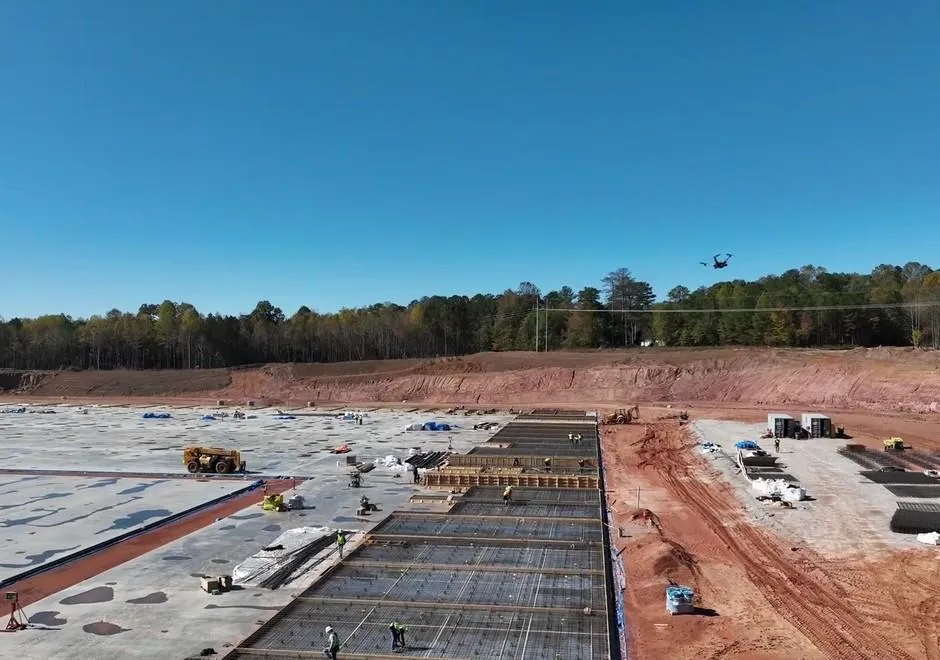
The drone flies your site from Trig Nest. Our team operates it remotely from Atlanta. Nobody on your crew stops work.
- 2Software
Check
Each scan is laid under the shop drawings, panel by panel, and compared — forms, embeds, blockouts, edges.
- 3Our team
Review
A person looks at every finding, throws out the false alarms and puts the next pour at the top of the list.
- 4Your crew
Deliver
Your super gets a short list of what to fix, pinned on the aerial. Each one is tracked until it is closed.
Tomorrow’s worklist — sample
- Pours Thu
P-06 · Embed plate 5 in. east of drawing
Pinned on today’s aerial
- Pours Thu
P-15 · Door blockout 3 in. too narrow
Pinned on today’s aerial
- Pours Fri
F-22 · Anchor bolts rotated 90°
Pinned on today’s aerial
- Fixed 7:40 am
P-03 · Reveal strip missing, east edge
Pinned on today’s aerial
A person reviews every finding before your crew sees it. False alarms get thrown out. The pour that’s closest goes to the top. Nobody on your job has to learn to read a point cloud.
One real job
192 panels. 26 mistakes that never got poured.
A tilt-up job in Bremen, Georgia. We tracked every panel against its own drawing, from forming to pour, flying the site remotely. Each pin below is something that was wrong in the forms — found while it could still be fixed with hand tools.
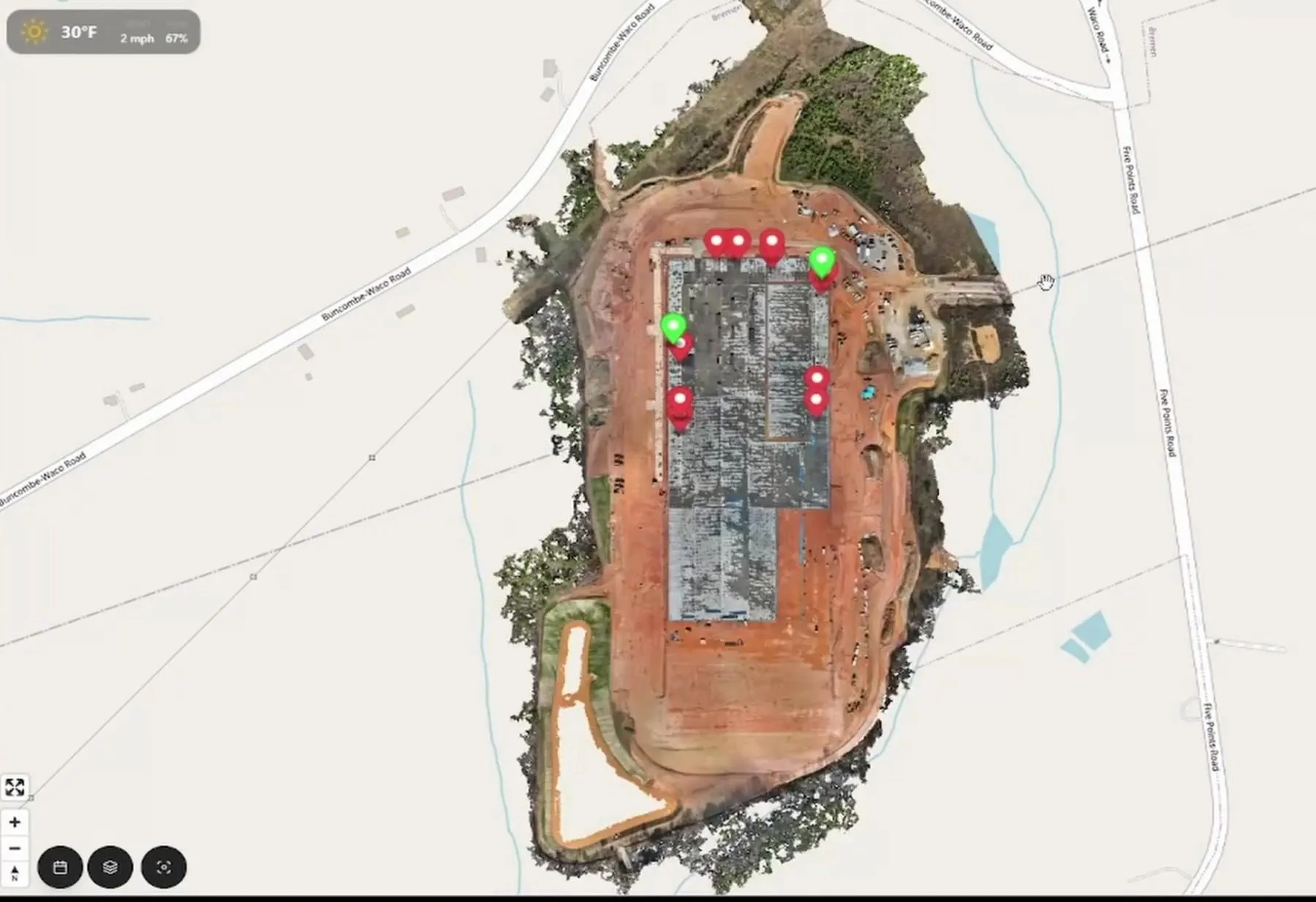
- 192
- panels tracked one by one, each against its own drawing
- 85
- scans flown remotely across the job
- 26
- issues caught before concrete was placed
Caught while the forms
were still open.
The hardware · Trig Nest
Day zero: no power, no signal, no eyes.
One lift fixes all three.
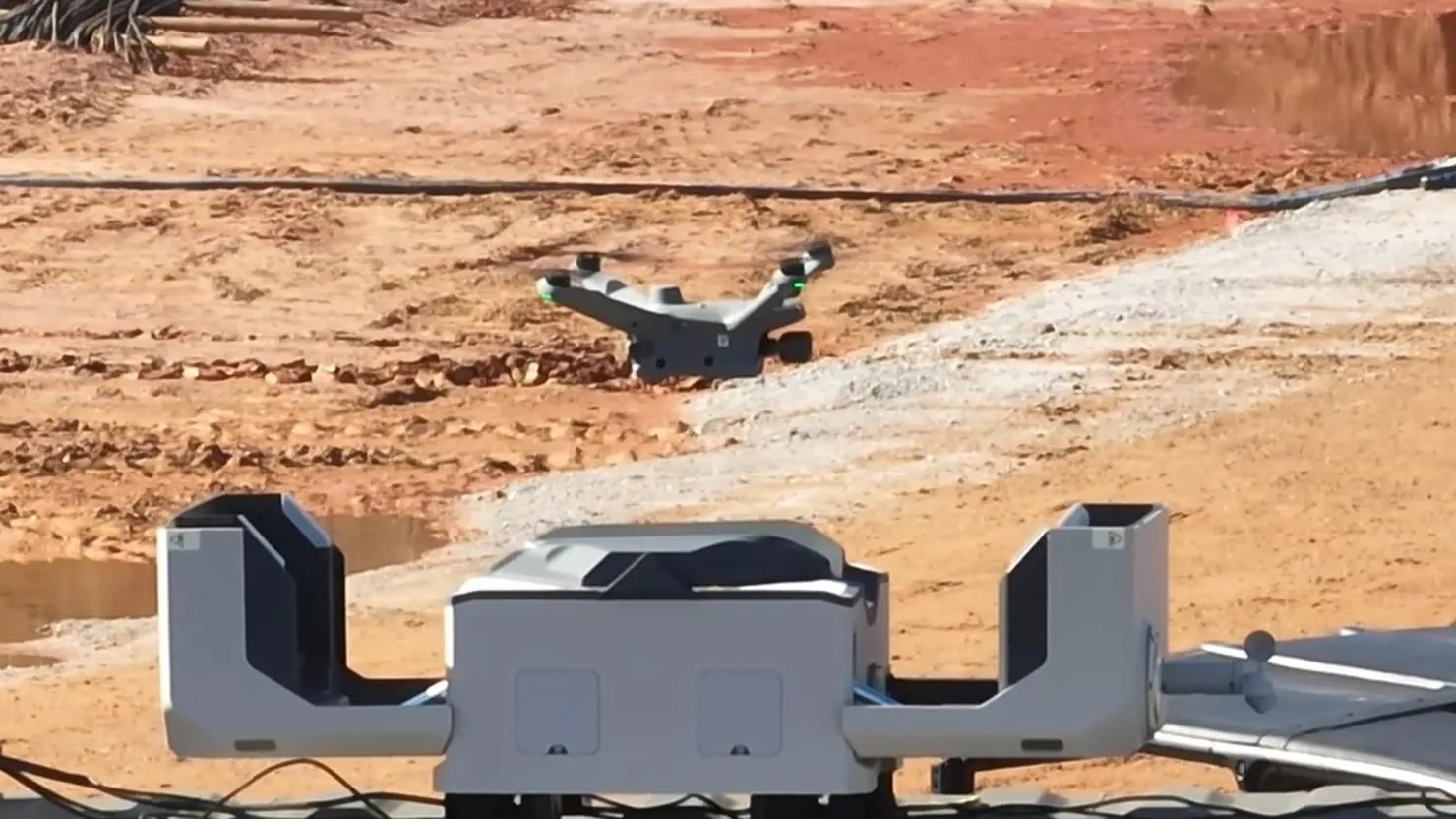
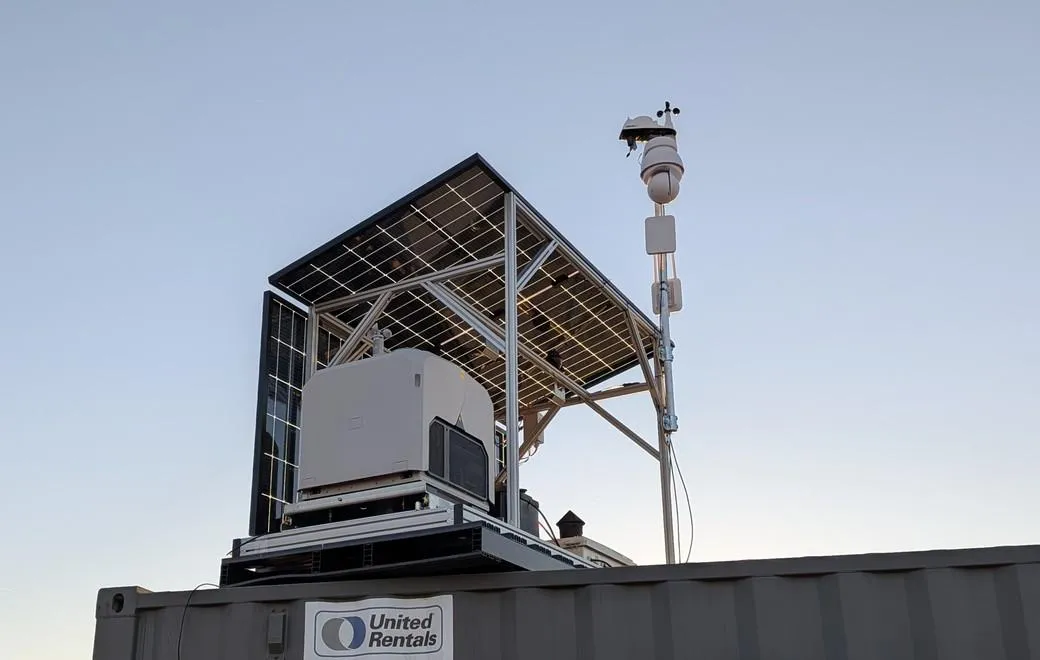
Trig Nest is an 8 ft × 4 ft solar drone station. A forklift sets it on top of your conex. About 30 minutes later your site has power, internet, weather, a camera and a drone that flies itself — before the first footing is dug.
01 · Power
Runs on the sun
Solar panels and an onboard lithium battery. No temp service, no generator to fuel, no waiting on the utility.
02 · Connection
Internet
The Nest brings its own connection, so the site is online the day the unit lands.
03 · Awareness
Weather tracking
A weather station on your site, not the airport 20 miles away. It feeds your pour schedule.
04 · Awareness
PTZ security camera
Pan, tilt, zoom. Watch the pour or check the gate without driving out.
05 · Action
Drone in a box
The drone lives on site, charges itself and flies on schedule. SkyMul pilots fly it remotely.
06 · Action
RTK GPS corrections
A base station on site, so every scan lines up with your control — and with yesterday’s scan.
The software · GleeBuild
Then run the rest of the concrete job in the same place.
The scan is the foundation. GleeBuild puts your panels, your pour schedule, your tickets and your daily reports on top of it — so the office, the trailer and the owner are all looking at the same slab.
Pour planner — sample
Sample pour schedule: five pour sets on a week calendar with a weather row. One pour set has been moved from Wednesday to Friday because of rain.
Concrete ticket — sample
- Supplier
- Thomas Concrete
- Mix
- 4,000 psi
- Load
- 10.0 cy
- Batched
- 6:42 am
- Concrete temp
- 74 °F
- Goes to
- Panels · Set 4
Set 4: 64 cy planned · 60 cy ticketed so far
Today’s site, under your drawings
Step through every flight by date. Turn your CAD layers on over the aerial. Measure anything.
Every panel and footing, tracked
Formed, poured, standing. Click one for its status, its panel-book page and its history.
A pour schedule that knows the weather
Drag pours on a calendar. Rain and wind over your limits show up before you commit the trucks.
Tickets read off a phone photo
Snap the batch ticket. PSI, yards, time and temperature are read and tied to the pour.
A daily report that’s mostly written
Weather, manpower, pours and issues pull in on their own. Review, sign, print.
A phone app your super will use
Photo, ticket, task. Three buttons, built for gloves and sunlight.
You run the job.
We handle the flying.
You already have enough to coordinate. Here is the full list of things this adds to your plate.
- You do not have to:
Buy a drone - You do not have to:
Hire a pilot - You do not have to:
Get a Part 107 license - You do not have to:
Pull temp power - You do not have to:
Dig a trench - You do not have to:
Pour a pad - You do not have to:
Wait on the internet company - You do not have to:
Install software - You do not have to:
Add a QC headcount - Lend us a forklift for 30 minutes. That’s it.
From people who pour concrete
“…cost us thousands of dollars, time, and our reputation.”
“As a concrete contractor, I believe the future of our industry lies in telepresence construction, enabling us to secure jobs farther from our home office. With SkyMul’s drone scans, delivering ¼-inch accuracy for as-builts and archival, it’s a game changer.”
VEMAC Concrete
“This is the perfect solution for the misplaced anchor bolts, which have cost us thousands of dollars, time, and our reputation.”
Concrete contractor
“I’ve seen numerous project delays and added expenses due to inaccurate placement of anchors and slab edges. This system is indeed filling a void.”
Structural Engineer, 360 Engineering Group
- Featured in Tilt-Up Today, the Tilt-Up Concrete Association’s magazine
- Speaker, 2026 Tilt-Up Convention
- Top 10 Innovation, World of Concrete 2020
- R&D backed by NSF and U.S. Air Force SBIR awards
How to start
One job. Four months. See what it catches.
Don’t roll anything out company-wide. Pick one job that’s about to start forming. We set up, fly it every day and review it with you every month. If it doesn’t pay for itself in rework you didn’t do, don’t take it to the next job.
- 1
Site walk
We look at the job with you and your drawings. You get a written quote.
- 2
The Nest lands
One forklift lift onto your conex. About 30 minutes. No trades.
- 3
Live in 3–5 days
Targets set, drawings loaded, flight plan cleared. Daily flights start.
- 4
Monthly review
We sit down with your team: what was caught, what it saved, what’s next.
- No drone or pilot to hire
- No power or internet needed
- Every user included
Fair questions
What contractors ask us first.
Something else? Email contact@skymul.com. A person answers.
Do we need a drone, a pilot or a license?
No. SkyMul flies the site for you with FAA Part 107 certified pilots and cleared flight plans. With Trig Nest the drone lives on your site in its own box and we fly it remotely. Your crew never touches it.
Our site has no power and no internet yet. Is that a problem?
That is exactly what Trig Nest is for. It is one 8 ft × 4 ft unit that runs on its own solar and brings its own internet. A forklift sets it on top of your conex — no trench, no pad, no electrician — and the site is live from day zero.
How accurate is it?
¼-inch in XY. Scans are aligned to your survey control with calibrated targets and RTK GPS corrections from the Nest. That is tight enough to check embeds, anchor bolts, blockouts, form lines and slab edges against the drawing before the pour.
Is this just software flagging things automatically?
No. Software does the comparing, and then our team reviews every finding, removes the false positives and puts the upcoming pour first. Your crew gets a short list they can act on, not three hundred alerts.
How soon after a flight do we hear about a problem?
The same day. The point is to tell you while the forms are still open and the fix is a hammer, not a core drill.
How fast can we be up and running?
Setting Trig Nest on site takes about 30 minutes. Most projects are live within 3–5 business days of the site walk — that is the time to set targets, load your drawings and clear the flight plan.
What do you need from us?
Your CAD site plan (DXF), your panel and footing drawings, the PDF sheet set, and your survey control points. We load all of it. You do not build anything in the software before you can use it.
Will my superintendent actually use it?
Supers mostly use the phone app: take a photo, snap a concrete ticket, check off a task. The office side has built-in guided tours and a command palette, and it opens in any browser. Nothing to install.
Can the owner or GC see the job without calling me?
Yes. Give them a read-only guest seat. They see the same daily aerial, panel progress and reports you do, and you stop driving out to take update photos.
Is Trig Nest required to use GleeBuild?
No. On shorter jobs our pilots can fly the site on a schedule and you use GleeBuild the same way. Trig Nest is for sites that want capture every day — plus power, internet, weather and a camera — without anyone having to show up.
What does it cost?
Most contractors start with a 4-month pilot on one job: setup, daily flights and a monthly review with our team. After that it is a monthly platform fee per contractor — every user included — plus a monthly fee for each site we fly, with the Nest leased or owned. You get a written quote after the site walk, before you commit to anything.
Buried is final.
Look first.
Your next job has a few thousand things to get right before the trucks show up. Let us check them with you. Start with one job.
- Reply within one business day
- Written quote before you commit